Parameter trees and structured outputs
Pass named weights and bias as runtime tensor inputs, return predictions with a summary and manage the whole result tree.
Run cells from top to bottom. Typed declarations and imports carry into later cells. Shift + Enter runs a cell. Reloading or leaving this page discards edits and Java state.
Give the parameters a place in the input
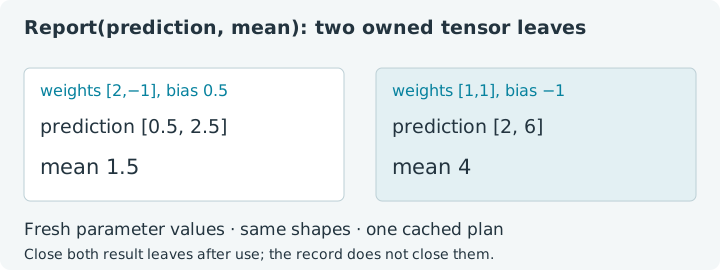
A tiny linear layer receives rows [1, 2] and [3, 4], weights [2, -1]
and bias 0.5. Its predictions are [0.5, 2.5]. Replace the weights with
[1, 1] and the bias with -1: the same layer now predicts [2, 6].
We want those new parameter values to affect replay without rebuilding a
compiled object or relying on a mutable Java closure.
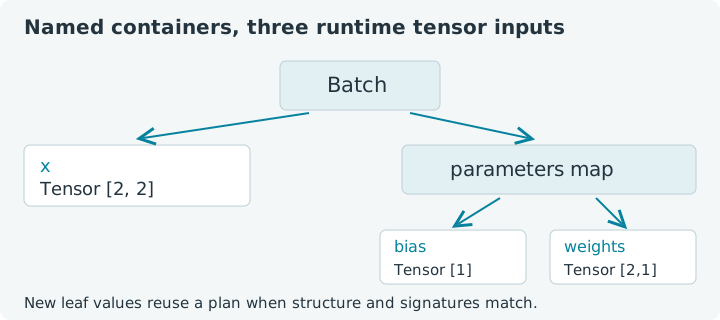
Jit.compileTree accepts a structured input whose leaves are tensors and
preserves a structured tensor output. A tree here is a nested arrangement
of containers, such as records, maps and lists. The container describes where
a value belongs; the leaf tensor supplies its runtime data and signature.
Choose Run all, then replace values and observe the cache count. This notebook uses the bundled jax4j 0.2.1 CPU backend in the emulated browser JVM. Its Java record declarations and explicitly typed compiled variable persist between cells. Reloading clears that state and discards edits.
1. Name inputs and results with records
Batch contains the features plus a map of parameters. Report contains
predictions and their mean. The function looks up the named tensor leaves,
performs a matrix product and broadcasts the bias over the resulting rows.
It returns two tensors, without downloading either into Java inside capture.
Java records make the structure readable, but they do not own or automatically
close their tensor fields. We will close ordinary inputs with try and close
the new result leaves after printing them.
1. Compile a structured linear layer
The input structure is a record containing a tensor and a map containing two more tensors. The output structure is a different record with two tensor leaves. A compiled tree is not limited to returning the same structure it receives. The body establishes its output structure during capture, and replay rebuilds that recorded structure with the new output handles.
The compiled variable's explicit type matters in this notebook: it is retained
for later cells. A top-level var declaration would be local to that cell's
execution. Local var declarations inside a try block are useful for
short-lived result containers, as in the next example.
2. Evaluate and close the result leaves
The features have shape [2, 2], weights [2, 1] and bias [1].
The matrix product has shape [2, 1]; adding the bias preserves it. The mean
is one value. Each row is easy to check: 1×2 - 2 + 0.5 = 0.5, then
3×2 - 4 + 0.5 = 2.5.
2. Run the first parameter set
Expect predictions [0.5, 2.5], mean 1.5 and one plan. Both returned
tensors have explicit owners in the inner resource list. The outer resources
own the inputs. This layer creates new output tensors, so closing those outputs
does not close x, w or b.
Try this: change the first feature row to [2, 2]. Only the first
prediction changes, becoming 2.5, and the mean becomes 2.5. Return to the
original features before following the remaining reference values. Keep the
shapes unchanged so this edit asks about runtime data rather than specialization.
3. Replace parameters without replacing the compiled object
Now supply fresh weight and bias tensors with their original shapes. The features are unchanged. Because the parameter tensors are explicit input leaves, replay binds their new buffers alongside the feature buffer.
3. Replay with new weights and bias
Expect [2, 6], mean 4 and still one plan. The example reverses the
order in which map entries are written. String map keys are traversed in sorted
order, so those two constructions describe the same tree structure. Insertion
order does not turn the bias into the weight matrix.
TreeUtil.closeAll visits a tree and closes each distinct tensor object once.
It is convenient for a result with many owned leaves. It does not infer which
leaves you own: if a function returns an input unchanged, that output is borrowed
from the caller. Closing the entire result would then close that input too.
These examples return newly computed leaves, making whole-result cleanup
appropriate. Keep this ownership decision explicit when designing larger trees.
4. Inspect the tree without packing its tensor data
Flattening a tree produces a list of leaves and a structural definition.
It does not concatenate their numerical contents into one large tensor.
The record's field order puts x first; sorted parameter-map keys then place
bias before weights. Shape inspection makes this visible without reading
the tensor values.
4. Inspect the runtime leaves
Expect three leaves with shapes [2, 2], [1], [2, 1] in that order.
The structure is part of the compiled-tree cache key, together with each leaf's
shape, dtype, device and backend. Changing tensor values alone preserves the
key. Changing a record type, map keys, list length or a leaf signature changes
what the callable must specialize for.
A tree is a way to make related arguments explicit, not a requirement to flatten all model parameters into a giant vector. This layer can keep matrix weights and a vector bias in their natural shapes. Later, structured gradients and optimizer state can follow the same named organization.
5. Change the batch size while preserving parameter shapes
Add a third feature row [5, 6] and restore the original parameters. The
new prediction is 5×2 - 6 + 0.5 = 4.5. Features now have shape [3, 2],
so this is a new input signature even though the record and map structures
are unchanged.
5. Add a third observation
Expect [0.5, 2.5, 4.5], mean 2.5 and two plans in the original
sequence. Return to the two-observation cell: it can reuse its earlier plan.
A new batch size changes the output prediction shape, while the one-element
summary keeps its shape. Each captured plan retains the output structure and
signatures established for its corresponding inputs.
6. Ordinary numbers are not tensor leaves
The general tree utility can traverse ordinary Java values, but compiled tree
inputs require tensor leaves. A raw Double in a parameter map is not silently
recognized as a static argument or converted into a dynamic tensor. The next
cell catches this deliberate mismatch before the function body is captured.
6. Catch a non-tensor runtime leaf
Even though the body never uses rate, validation encounters it as a
non-tensor leaf. Remove that entry and the function can return [2, 4].
For a changing scalar parameter used by the calculation, supply a one-element
tensor and read it through tensor arithmetic. For deliberately fixed Java
configuration, use stable capture-time values and recreate the callable when
that configuration changes. Custom tree-node metadata is a separate, more
advanced mechanism; arbitrary map numbers do not become metadata by themselves.
Return to capture rules when deciding which values belong in the explicit input, and revisit matrix multiplication to extend the layer's features or outputs. You can now give a compiled function both a readable input schema and a useful collection of tensor results.