Batch a function with vmap
Write a score for one observation, apply it across a batch and preserve the meaning of each example’s reductions and gradients.
Run cells from top to bottom. Typed declarations and imports carry into later cells. Shift + Enter runs a cell. Reloading or leaving this page discards edits and Java state.
One score per observation
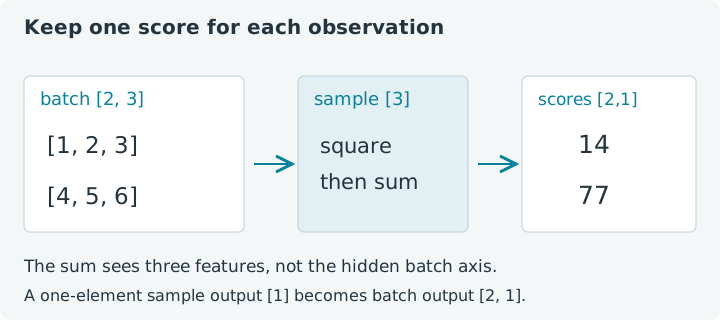
The observations are [1, 2, 3] and [4, 5, 6]. For each, you want the sum
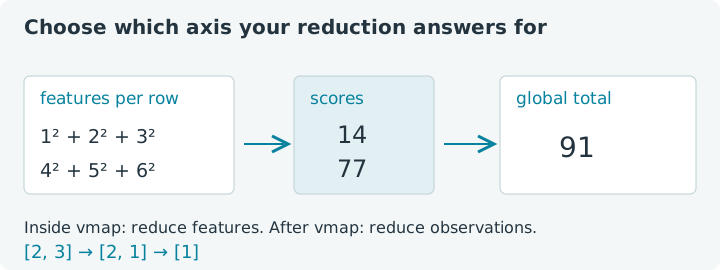
of its squared entries: 14 and 77. A global sum of squares would give 91,
which answers a different question. The challenge is to preserve what “one
observation” means when you apply the same function to a whole batch.
Vmap.apply maps a tensor function over an input axis. In its simplest form,
it maps axis zero and puts the mapped axis at the front of the output. The
function receives the logical shape of one example; batching rules carry the
extra axis through its tensor operations.
Choose Run all, then modify the inputs or score. This notebook uses the bundled jax4j 0.2.1 CPU backend in the emulated browser JVM. Typed declarations and imports persist between cells; leaving or reloading discards that state and your edits. These small examples explain behavior, not native performance.
1. Write the function for one example
Our score is sum(x²). It receives a vector and returns a one-element tensor
with shape [1]. That singleton shape matters: mapping two examples later
will produce [2, 1], rather than dropping the final dimension automatically.
The lambda is evaluated through the mapping or tracing context in these
examples, so its intermediate tensors belong to that context. Ordinary inputs
and returned outputs have explicit owners in try resource lists.
1. Score a single observation
Expect shape [1] and score 14. We use Jit.apply here for a one-shot
traced evaluation of the small expression. Calling an ordinary chain outside
any transform would require managing its intermediate tensors yourself.
Try this: change the single row to [1, 0, 0] and predict score 1.
Then restore it. This cell's single-row input is separate from the
observations array used by the following batch cells; changing one does not
silently change the other.
2. Give vmap a batch
The batch has shape [2, 3]: two observations, three entries each. Mapping
axis zero hides that axis from the function's logical view. The sum inside
score therefore reduces three entries for each observation independently.
2. Map the score across rows
Expect shape [2, 1] and values [14, 77]. Change only the last entry of
observations from 6 to 0 in setup, then rerun setup and this cell.
Only the second score changes, becoming 41. You have changed one example,
so the first result should remain 14. Restore the original data for the
remaining references.
Try changing the score's final .sum() to .mean(). Each output becomes
the average of that row's squared entries: 14 / 3 and 77 / 3. The
function's logical input shape determines the reduction size. It does not
average across the mapped observations unless you separately reduce that
axis after mapping.
3. Compare with a global reduction
Applying square and sum directly to the batch reduces all six entries. The result is useful when you genuinely want a total across observations, but it cannot tell you which example contributed which score. The code makes that choice visible by naming its intermediate squared tensor.
3. Reduce the whole batch explicitly
Expect shape [1] and value 91. As an experiment, add a sum over the
mapped scores in the previous cell and compare the totals. The sum of
per-example sums matches the global sum. Replacing sums with means needs more
care: averaging per-example means equals the global mean here because every
example has exactly three entries.
You can also express this particular score directly with an axis reduction.
Vmap becomes useful as the per-example function grows: it preserves the
same sample-level interpretation for supported matrix operations, indexing
and derivative transforms without rewriting each one for a new batch axis.
A mapped function is a reusable unit of computation, not just shorter syntax
for this one reduction.
4. Observe one Java body evaluation
In this implementation, vmap applies batching rules to a function evaluated once. It does not call the Java lambda separately for every observation. A small counter makes that visible. Like the capture counter in Chapter 3, it is an observation tool; production tensor functions should avoid relying on side effects for per-example behavior.
4. Count Java body evaluations
Expect [14, 77] and one Java body call. Adding more rows does not make
this counter increment once per row. Ordinary Java random generators, log
statements and collection updates inside the lambda therefore cannot stand
in for tensor operations that should vary across examples.
Keep host value reads outside the mapped function. Calling .item() or
.toFloatArray() on a traced value inside vmap is unsupported. Print the
returned tensor afterward, as these cells do. Shape metadata describes the
logical sample; the hidden mapped axis is handled by the batching transform.
5. Map a gradient function
The gradient of one score is 2x. Mapping that gradient gives a separate
vector of sensitivities for every observation. Its output shape follows the
sample gradient shape, [3], with the mapped axis restored in front.
5. Compute per-observation gradients
Expect [2, 3] and [2, 4, 6, 8, 10, 12]. These are derivatives with
respect to the entries of each observation, not gradients of shared model
weights. A shared parameter used by every example introduces a different
question about accumulating or retaining its per-example contributions.
Try the mean-squared score again. Each component becomes 2x / 3, so the
first row's gradient is approximately [0.666667, 1.333333, 2]. Mapping the
derivative preserves the function's chosen objective. It does not decide
whether a sum, mean or another weighting was appropriate for your application.
6. Capture the batched function for replay
Vmap.of(score) produces a reusable tensor-to-tensor function. We can pass
that function to Jit.compile, then replay it with fresh batches sharing the
same signature. Batching defines the sample interpretation; compilation
adds cached execution plans.
6. Compile and replay a mapped score
With the original score, expect [14, 77], then [1, 4], and one plan.
Change only the values and replay again. Changing the batch shape creates a
new signature, just as in Chapter 3. Rerunning the cell recreates its compiled
object, so counts restart for that object.
Batching needs an implementation rule for each operation the function uses. An available tensor method is not automatically supported under vmap, and successful batching is not a promise of one GPU kernel or a particular speedup. These examples deliberately stay within the supported arithmetic, reductions and gradient composition.
Continue with mapped inputs, shared inputs and output axes to pass one parameter vector to every example and map a non-leading axis. Revisit axis reductions if you want to write a direct reduction alongside the mapped version and compare shapes.