Start on CPU, select a GPU engine
Choose tensor placement explicitly, inspect available providers and distinguish native GPU engines from the browser WebGPU bridge.
Run cells from top to bottom. Typed declarations and imports carry into later cells. Shift + Enter runs a cell. Reloading or leaving this page discards edits and Java state.
Four numbers, two possible places to compute
Squaring [1, 2, 3, 4] and summing gives 30. The interesting question here
is where those operations happen. Can you identify the device that owns the
input, select another one deliberately, and explain what crosses the boundary?
A GPU selection deserves more evidence than a reassuring variable name.
A backend implements tensor operations. A device identifies a placement,
such as cpu:0 or wgpu:0. A device descriptor is a request, not proof that
an adapter exists. Constructing Device.wgpu() neither installs a library nor
makes the browser grant access to a GPU.
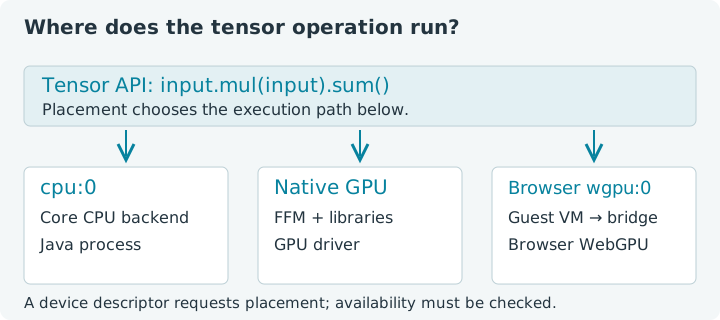
Choose Run all. CPU cells work independently of GPU availability; optional GPU cells print a clear message when no usable browser adapter is available. The first dependency loads both bundled core and the notebook bridge before backend discovery. Each lesson has its own session; leaving or reloading loses edits and Java state. The browser JVM uses a custom JDK 27, while a normal local jax4j application can use Java 25.
1. Start with a known CPU placement
We set the default backend to CPU before creating tensors. The system property
is jax4j.tensor.backend; a native process can also set JAX4J_BACKEND.
An explicit system property takes precedence over the environment variable.
Pinning an unavailable default backend raises an error rather than quietly
choosing a different engine.
The notebook's browser adapter has lower selection priority than CPU anyway. Writing the property makes our intention visible and keeps later experiments from changing the placement of the reference calculation.
1. Confirm the CPU calculation
Expect cpu:0 -> 30.0. The intermediate square and scalar result are both
owned tensors, so both appear in the resource list. A reduction changes shape
and value; it does not move a tensor to another device.
Try this: change the fourth input to 5. The sum becomes 39. Rerun
only this cell: you have checked the arithmetic without involving device
selection. Restore the fixture when comparing the reference answers below.
2. Ask which providers are usable
A provider on the classpath and a working device are different things.
Tensors.backends() returns available providers, while Tensors.devices()
returns an ordinal-zero descriptor for each available provider. This is not a
complete inventory of every physical GPU or a promise about multi-GPU support.
Availability checks can initialize native runtimes or request a browser adapter. They are useful diagnostics, but running them before a cold-start measurement has already warmed part of the system. Here that initialization is intentional.
2. Inspect available providers and placements
CPU should be present. A usable bridge also reports a wgpu provider and
wgpu:0. The browser must support WebGPU in this context and expose a suitable
adapter. A hardware-enabled Chrome configuration is encouraging, but the request
from this page is what establishes actual availability.
The dependency directive must remain in the first cell. Backend providers are discovered once by the registry. If you initialized a core-only session and then added the bridge, use Restart and run the revised setup first. Installing code after discovery does not refresh that static registry.
3. Select a device independently of the default
arrayOn places newly supplied host values on the requested device. Its
explicit shape must describe the supplied data. We start with CPU again so
you can separate the placement API from optional hardware requirements.
The default selects a location for factories that do not receive one. An explicit device selects the provider for that request. Changing the default later does not migrate tensors that already exist.
3. Place host values explicitly
The answer remains 30, with input shape [4] on cpu:0. For a native
application, Device.cuda(), Device.rocm(), Device.vulkan() and
Device.wgpu() request the corresponding engine's first device. Supplying a
descriptor for an unavailable engine fails; it does not convert the operation
to CPU work.
4. Run the same primitive operations on browser WebGPU
This cell requests wgpu:0 only after the availability check. It deliberately
prints a skipped message if the adapter is unavailable. There is no CPU
substitute hidden behind the GPU label. A later device loss can still cause
an error even after a successful availability check.
The bridge dispatches real browser GPU kernels for these operations. The guest JVM sends commands to JavaScript through the VM bridge, and JavaScript submits them to WebGPU. That communication contributes overhead of its own.
4. Select the browser GPU explicitly
Expect 30 again when the GPU cell runs. Four numbers are an arithmetic
fixture, not a workload likely to repay GPU setup and communication costs.
Use the Monte Carlo introduction for a
larger resident GPU calculation. Do not turn this tiny example into a speed
claim by timing a single call.
5. Follow a transfer out and back
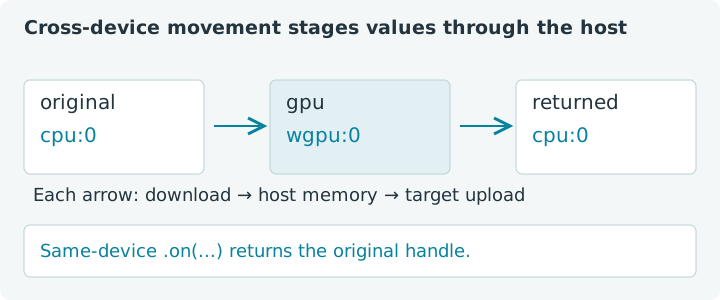
Tensor.on returns a tensor on the requested device. In jax4j 0.2.1 a
cross-device move downloads through host memory and uploads to the target
backend. It is not a direct GPU-to-GPU transfer. The destination has its own
lifetime; the source remains valid and still needs closing.
5. Move explicitly and keep both owners visible
The returned values should be [1, 2, 3, 4]. Cross-device transfers can
be useful at application boundaries, but repeating this round trip inside an
inner loop often defeats the point of resident GPU data. Place inputs once,
do substantial work, and retrieve only the result you need.
There is an ownership exception worth remembering: .on with the tensor's
existing device returns the same Java object. It does not give you another
independently owned copy. The next lesson makes this aliasing behavior explicit.
6. Confirm the selected placement without another transfer
Operations inherit their input's placement. Inspecting .device() reports that
placement without downloading tensor values. .toFloatArray() does download
them, so keep reporting choices distinct from computation.
6. Check placement through an operation
This final cell openly chooses CPU if no GPU is available, and prints that
choice before doing any work. Expect [12, 13]. Change the selection to
Device.cpu() and rerun: the placement changes, while this exact arithmetic
answer stays the same.
Taking the selection into a native application
A local application needs core plus the matching optional engine artifact,
compatible native libraries and a working driver. All artifacts use group
com.nablatensor; use matching 0.2.1 release or locally built artifacts.
All of these library JARs were confirmed on Maven Central on 21 October 2026.
Publication does not establish hardware compatibility or operation coverage.
| Requested placement | Optional artifact | 0.2.1 validation |
|---|---|---|
Device.cuda() | jax4j-engine-cuda | Builds; execution last validated in 0.2.0 |
Device.rocm() | jax4j-engine-rocm | Implemented; hardware unverified |
Device.vulkan() | jax4j-engine-vulkan | Hardware validated |
Device.wgpu() | jax4j-engine-wgpu | Tensor hardware validated; no scalar replay adapter |
OpenCL has no engine in current jax4j. Vector API SIMD is an optional scalar
replay engine in jax4j-simd, not a tensor placement; it requires
--add-modules jdk.incubator.vector and execution is unverified for 0.2.1.
ROCm also has a published implementation but no hardware validation. Neither
native engine runs in this browser notebook. See the
current engine support matrix before choosing a native backend.
The native wgpu engine uses wgpu-native through FFM. This notebook uses its
own browser adapter under the same wgpu selector. Native engine capabilities
therefore cannot be inferred from the browser bridge. In particular, this
bridge supports the eager primitives shown here but rejects generated JIT and
device-region kernels. The next lessons keep compiled examples on CPU.
For installation details, use the jax4j README and native wgpu guide. Continue with native access, synchronization and resources to make completion and ownership as explicit as placement.