Native access, synchronization and resources
Manage tensor owners, recognize aliases and separate GPU submission, completion and readback, with optional browser GPU examples.
Run cells from top to bottom. Typed declarations and imports carry into later cells. Shift + Enter runs a cell. Reloading or leaving this page discards edits and Java state.
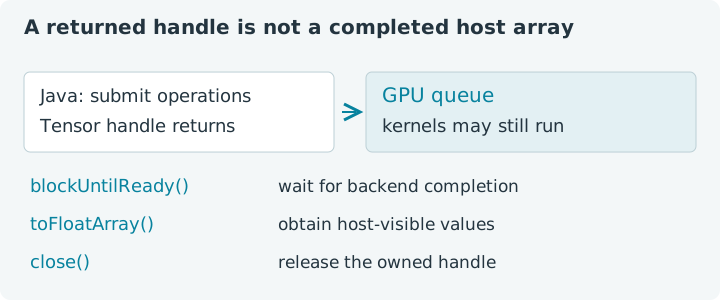
A result can exist before its work has finished
Imagine computing x² + 1 on a GPU. Java receives a tensor handle, but the
queue may still be processing the kernels that produce its values. Closing
that handle, waiting for completion and retrieving a Java array are three
separate actions. Understanding their relationship makes resource code much
easier to reason about.
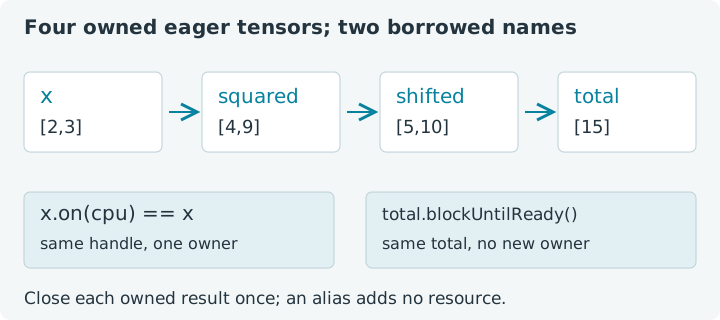
We will use [2, 3], whose result is [5, 10], and reduce it to 15.
The small fixture lets us focus on ownership. Every eager operation that
creates a new tensor also creates a resource to manage. Fluent syntax can
hide those intermediate owners even when the arithmetic looks simple.
Choose Run all. CPU cells always use explicit CPU defaults; optional GPU cells run only if this page obtains an adapter. The first dependency includes the browser bridge before provider discovery. Declarations persist in this lesson's Java session; leaving or reloading loses them and your edits.
1. Give each eager intermediate an owner
A try-with-resources block closes its resources in reverse declaration order, even when calculation or printing throws. The result closes first, then the shifted values, square and input. That order makes dependencies readable and limits how long temporary buffers stay live.
This is ordinary eager execution. The transform tracing contexts discussed in earlier chapters manage their own captured intermediates. Do not assume that an arbitrary eager expression gains that transform-specific behavior.
1. Own an eager calculation explicitly
Expect [5, 10] and 15. The tensors have left scope by the time this
cell finishes. Keeping a Java reference to a closed tensor would not make its
buffer usable again. Garbage collection is not a substitute for a predictable
lifetime when an application repeatedly allocates large device buffers.
Try this: replace 1 with 4. The values become [8, 13], with
total 21. Notice that the resource structure stays identical even though
the mathematical result changes. Restore 1 before following the next example.
2. Recognize a same-device alias
Some methods return the original handle. In this release, moving a CPU tensor to that same CPU device is one of them. Such a returned reference is an alias: a second Java name for the same object. It is not another allocation and does not create an additional owner that should be closed separately.
The comparison below uses Java reference identity, ==. It asks whether two
references point to the same tensor object; it does not compare their values.
2. Keep the same-device alias inside its owner
Expect same handle: true. Only x belongs in this resource list. Closing
alias early would close the object that x also refers to. Treat methods
according to their documented ownership behavior, rather than inferring it
from whether the method returns a Tensor.
A move to a different device does create a new owned tensor. The previous lesson used distinct resources for that case. If a helper accepts an arbitrary target, it must handle both cases deliberately; unconditionally closing its returned value can accidentally close a caller's input.
3. Wait without creating another tensor
blockUntilReady() waits through the owning backend's synchronization method
and returns the same handle. eval() is another spelling of this completion
operation. Neither method downloads an array for you.
The synchronization is backend-wide in the current implementation. It can wait for other outstanding work on that backend, so measuring one tensor with this method may include more than that tensor's own operations. Keep unrelated work out of a timing experiment.
3. Separate readiness from readback
Expect true and [5, 10]. The array is a host-side Java value. It is
separate from the tensor's resource lifetime and can remain useful after the
tensor closes. Obtaining it may require a transfer, synchronization, allocation
and conversion; readiness alone is a narrower request.
4. Reduce before retrieving a scalar
If you only need a sum, perform the reduction where the data already lives.
Then retrieve the one-element result. item() downloads the tensor on which
you call it and checks that it contains exactly one element. Calling it on
a large vector does not select a cheap first element.
This optional GPU cell keeps the input, square and reduction on wgpu:0.
It reads one scalar only after the reduction has completed. The same ownership
pattern works for a much larger input without needing a host copy of every
intermediate value.
4. Retrieve only the reduced result
The sum of squares is 13; this cell omits the earlier +1 shift. It
therefore has one fewer tensor to own. Synchronization establishes completion;
the subsequent scalar download establishes a host-visible value. An explicit
wait followed by readback may be redundant for obtaining values, but it exposes
the two boundaries when teaching or timing them.
5. Use the notebook's scope for short GPU chains
The browser adapter provides an extra helper, BrowserWebGpuBackend.scope().
It tracks GPU allocations made within the block and releases them on scope
exit. This lets a short eager chain avoid naming every intermediate solely
for cleanup. It is a notebook-specific helper, not a general core API or a
promise about the native wgpu engine.
Keep all GPU tensors created inside the scope inside it. A tensor returned from the block would already have been released. Host values such as floats and Java arrays can safely outlive the block after readback completes.
5. Let a notebook scope own a GPU chain
Expect 12: doubling [2, 3] and adding one produces [5, 7].
Change the multiplication factor and predict the answer before rerunning.
The scope closes only the GPU tensors allocated inside it. It does not take
ownership of tensors allocated before entry, and nested scopes must close
in reverse order on the notebook cell thread.
This is also why a scope must not hide a long-lived model parameter created inside its block. A convenient cleanup boundary is useful only when it matches the values' intended lifetime. For persistent state, use explicit owners as in functional Adam.
6. Return a new owner from a helper
A helper can return a tensor while closing its own temporary. The caller then owns the returned tensor. The input remains caller-owned throughout. Writing that contract down prevents a surprisingly common bug: a reusable helper that closes someone else's input or returns its own already-closed result.
6. Transfer result ownership to the caller
Expect [5, 10] while the input remains [2, 3]. The returned addition
owns an independent result buffer. This example relies on these arithmetic
operations creating results, not on the aliasing methods examined earlier.
Closing a tensor requests release; a native runtime may defer physical buffer
destruction until queued work can safely finish. Do not use a handle after close.
Native access belongs to the Java process
A local GPU engine uses Java's Foreign Function and Memory API, or FFM,
to call native libraries. For a classpath application, launch Java with
--enable-native-access=ALL-UNNAMED. For example, this is a native shell
command, not a Java notebook cell:
java --enable-native-access=ALL-UNNAMED -cp 'app.jar:lib/*' example.Main
The flag grants native access to the unnamed modules on the classpath. It
does not install an engine, driver or shared library. For native wgpu, the
release guide explains JAX4J_WGPU_NATIVE_PATH; the Java system property
jax4j.wgpu.native_path takes precedence when both are supplied. Use the
wgpu setup guide
for the library and diagnostic instructions.
This page's browser GPU path uses the Java-to-browser bridge instead of loading a host GPU library into the guest JVM. You do not supply desktop FFM flags in a notebook cell. The measurement notebook uses these ownership and completion boundaries to define useful timing intervals.