Elementwise operations and broadcasting
Calibrate a batch of sensor readings with one baseline vector, then discover which axis a broadcast really uses.
Run cells from top to bottom. Typed declarations and imports carry into later cells. Shift + Enter runs a cell. Reloading or leaving this page discards edits and Java state.
One calibration row, a whole batch of readings
Two observations arrive from three sensors. Each sensor has its own baseline, but that baseline is the same for both observations. You could write a nested loop that subtracts the right baseline from each reading. With tensors, the interesting part is expressing which dimension the baseline belongs to.
Our constructed batch has rows [10, 20, 30] and [12, 18, 33]. Subtracting
the baseline [10, 20, 30] should produce [0, 0, 0] and [2, -2, 3].
These deliberately small numbers make every output easy to inspect.
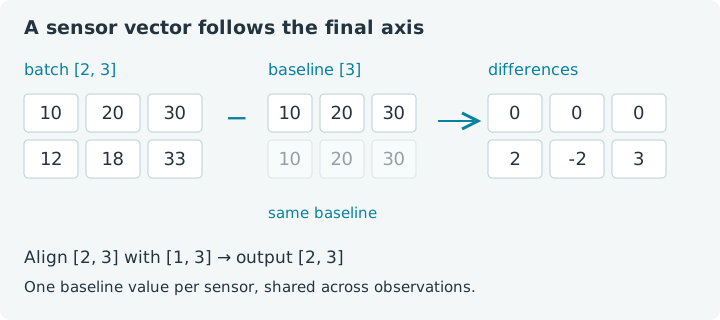
Broadcasting describes how compatible shapes expand to a common shape for an elementwise operation. It lets one calibration vector apply to a batch without asking your application to build a repeated Java array. The result still contains one value for each position in the batch.
Run the cells from the top, or choose Run all. Imports and named Java arrays
persist between cells; tensors in try blocks close when those blocks end.
This notebook uses jax4j 0.2.1 on the emulated CPU. No GPU is needed. If the
runtime is new, give it time to download and start. Reloading discards edits.
1. Establish the axis meanings
We will consistently use axis zero for observations and axis one for sensors.
A shape of [2, 3] then means two observations, each containing three sensor
values. The tensor cannot know those names; keeping them straight is our job.
1. Create the batch
The flat values are stored in row order. Seeing a single Java array in the
output does not make the tensor one-dimensional: its shape remains [2, 3].
Whenever an output surprises you, print its shape as well as its values.
Try this: change only the last reading from 33 to 35. Predict the
corresponding calibrated difference before running the next cell. Restore 33
when you want to follow the reference answers. Editing an earlier cell does
not automatically execute the cells that depend on it.
2. Arithmetic matches corresponding positions
The baseline has shape [3]. Broadcasting aligns it with the batch's final
axis, as though it had shape [1, 3], then expands the leading dimension to
match two observations. We also apply per-sensor gains [0.5, 1, 2].
2. Subtract baselines and apply gains
Expect differences [0, 0, 0, 2, -2, 3] and corrected values
[0, 0, 0, 1, -2, 6]. Multiplication here is elementwise: each difference
is multiplied by the gain for that sensor. Matrix multiplication is a separate
operation, explored in the last lesson of this chapter.
Change the third gain from 2 to 0. Both observations of the third sensor
now contribute zero. Change it to -1 and their signs reverse. You are editing
a parameter shared across observations, not selecting one particular row.
The original batch is unchanged because these operations create new tensors.
The same alignment rules apply to add, sub, mul, div, minimum and
maximum. Binary tensor operands must also share a device and dtype. A valid
shape does not authorize arithmetic between unrelated device placements.
3. Read shapes from the right
Compare trailing dimensions first. Each aligned pair must be equal, or one
must be 1. Missing leading dimensions behave as ones. The output takes the
expanded dimensions. For this example, [2, 3] and [3] give [2, 3].
For one offset per observation, use shape [2, 1]. Its trailing one expands
across all three sensors. A bare [2] vector instead tries to match the final
axis of length three, which is incompatible.
3. Give each observation its own offset
The result is [110, 120, 130, 212, 218, 233]. Every entry in the first row
received 100; every entry in the second received 200. Draw the shapes on paper
and align their right edges. That habit scales surprisingly well when the
arrays acquire batch, time and feature dimensions.
The size-one dimension carries meaning here. Removing it changes the alignment request; it is not merely tidying up punctuation. To see the shape check in action, the next cell deliberately leaves that dimension out and catches the exception so that Run all can continue.
4. Catch an incompatible broadcast
Change wrong to Tensors.array(new float[] {100, 200}, 2, 1) and rerun. The
operation becomes valid. A useful debugging sequence is to write the intended
axis meaning first, print both actual shapes, and only then choose a reshape.
Guessing dimensions until the exception disappears can produce a valid answer
to a different question.
4. The square-matrix trap
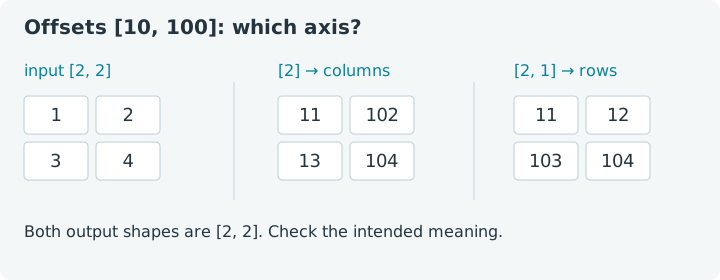
A mistaken broadcast is harder to notice when dimensions happen to have the
same length. In a [2, 2] matrix, a [2] vector is compatible. It still aligns
with columns, even if you meant one offset per row.
5. Compatible does not always mean intended
The column result is [11, 102, 13, 104]; the row result is
[11, 12, 103, 104]. Both have shape [2, 2], and neither needs to throw an
exception. This is why numerical checks with recognizable input are valuable.
Try making every input zero. The output then displays the expansion pattern
without the original values getting in the way. Next change the offsets to
[1, 10] and predict both outputs. Once the alignment feels natural, return
to the sensor example and design one baseline per sensor plus one offset per
observation. Apply them in separate steps so each result is easy to inspect.
5. Unary operations need no second shape
A unary operation transforms one tensor. For example, relu() replaces
negative entries with zero, while abs() removes their signs. Neither chooses
an axis to reduce: the output retains every input position.
6. Transform each error value
You should get [4, 0, 9], [0, 0, 3] and [2, 0, 3]. Now add -4 to the
input and predict the final entry in each output. These operations answer
different questions: squared error emphasizes large discrepancies, a positive
part ignores negative entries, and absolute value retains their magnitude.
Choose the calculation that matches the quantity you need.
Broadcasting is a shape rule, not a promise of free storage. In this version,
jax4j may materialize expanded operands and closes those temporary broadcast
buffers after the binary operation. You still own the result tensors. The
short try resource lists make those lifetimes explicit and work without a
notebook-specific GPU scope.
For your last experiment, calculate the mean squared error of [-2, 0, 3].
Keep the squared tensor, then call mean() in another resource declaration.
The answer is 13 / 3, about 4.333333 in F32. Notice the transition: squaring
preserves three positions; the mean reduces them to one value.
Continue with reshape, slice and reduce to organize a batch with time and feature axes. Revisit shapes, dtypes and tensor lifetimes if you want to explore how shape checks and FP32 rounding differ.