Shapes, dtypes and tensor lifetimes
Arrange six values, reduce along an axis, explore a floating-point surprise and make tensor ownership explicit.
Run cells from top to bottom. Typed declarations and imports carry into later cells. Shift + Enter runs a cell. Reloading or leaving this page discards edits and Java state.
Six numbers can tell different stories
Take [1, 2, 3, 4, 5, 6]. Are these six consecutive measurements? Two readings
from each of three sensors? Three readings from each of two sensors? The values
alone cannot tell you. A shape assigns those values an arrangement, and your
application assigns meaning to its axes.
This notebook keeps the numbers small so every rearrangement is visible. We will also meet a surprisingly large number to expose FP32 rounding, then return to small tensors to examine ownership. If you have just completed your first tensor, the operations will feel familiar. This lesson starts its own session and imports: you do not need to keep that earlier page open.
Choose Run all for the complete worked example. Afterwards, change the cells and explore. The intentional shape failures are caught and printed, so they do not stop the notebook. When you make an uncaught error of your own, fix the cell and run it again. Restart clears Java state; reloading also discards edited code.
1. Shape, rank and size
The rank is the number of axes. The size is the total element count,
obtained by multiplying the dimensions. Shape [2, 3] therefore has rank two
and size six. Axes are numbered from zero: axis zero has length two, and axis
one has length three.
1. Describe a matrix
Expect shape [2, 3], rank 2, element count 6 and dtype F32. The flat
input fills rows in order: first [1, 2, 3], then [4, 5, 6]. A shape says
nothing about “sensors” or “time” by itself. Write down which axis means what
before a larger model starts passing tensors around.
Try this: change the factory dimensions to 1, 2, 3. The rank becomes
three while the size stays six. Now try just 6: rank one, still six elements.
Return to 2, 3 for the next diagram. Here is an especially useful distinction:
shape [1] is a one-element vector; an empty shape [] is a rank-zero scalar.
Both contain one value. Rank is not another name for element count.
2. Reshape preserves the sequence
reshape changes dimensions while keeping the flattened element order. One
requested dimension may be -1; jax4j infers it from the total size. Six values
reshaped to (-1, 2) become three rows of two. Nothing has been sorted or
transposed.
2. Reshape or transpose?
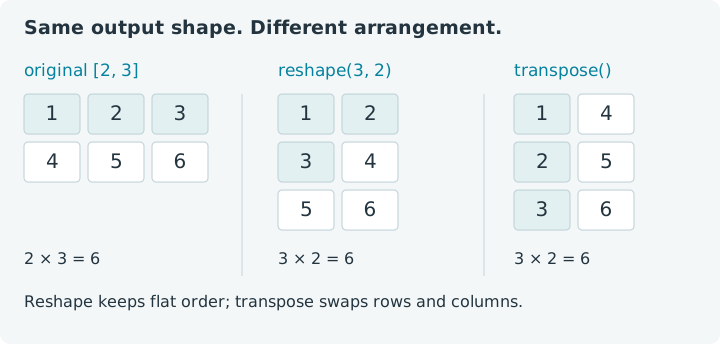
Both results have shape [3, 2], but their values differ. Reshape retains
[1, 2, 3, 4, 5, 6]; transpose gives [1, 4, 2, 5, 3, 6]. A transpose swaps
rows and columns of this rank-two tensor. The diagram shows why those two
operations answer different questions even when their output shapes agree.
Try reshape(1, -1) and predict both dimensions. Then try reshape(3, 2) and
compare it with the inferred version. A reshape produces a distinct tensor
handle. Whether a backend shares storage or copies it is an implementation
detail: the CPU backend can share this immutable storage. Close the handles you
create without assuming that a reshape necessarily copied every byte.
Pause before editing: would reshape(4, 2) preserve the element count?
Six values cannot fill eight positions. We can make that failure part of the
experiment without interrupting later cells.
3. Catch a shape mismatch
Change the requested dimensions to 2, -1 and the error disappears. Change
them to -1, -1 and the request is ambiguous: there may only be one inferred
dimension. These are valuable errors. Shape checks locate a disagreement near
the operation that introduced it, before downstream numbers become mysterious.
3. Choose the axis you want to remove
A reduction along an axis combines values while preserving the remaining axes. For our two-by-three matrix, summing along axis zero combines the two rows, leaving three column totals. Summing along axis one combines each row's three entries, leaving two row totals.
4. Reduce along an axis
Column totals are [5, 7, 9]; row totals are [6, 15]. Passing true keeps
the reduced dimension with length one, giving shape [2, 1]. The values remain
the row totals. Keeping dimensions is useful when later operations need the
axis positions to line up, especially in broadcasting.
Change the input to [10, 20, 30, 40, 50, 60] and rerun the first cell before
this one. Every total should grow by ten. Next, switch the factory dimensions
in this cell to 3, 2. The same flat sequence now has different neighbors,
so axis-one sums become [30, 70, 110]. You have changed the question by
changing the shape. Restore the original values when you want the reference
outputs again.
4. F32 has a precision budget
A dtype specifies an element's numerical representation. jax4j's enum names
several dtypes, including F32, F64, integer types and BOOL. That list is not
a promise that every factory and backend executes every type. The float[]
factory used here constructs F32 tensors; the current CPU upload path and
notebook GPU bridge support FP32 execution.
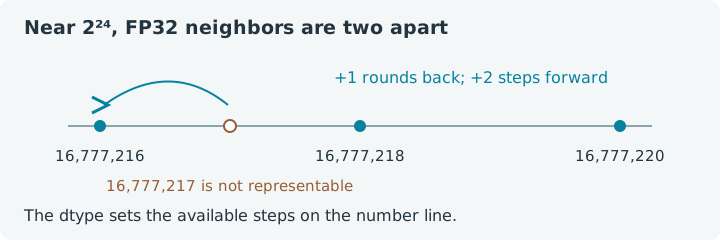
FP32 cannot represent every integer above 2²⁴, or 16,777,216. Near that value,
representable numbers are two apart. Adding one can therefore round right back
to the number you started with. Let's make that visible.
5. When adding one changes nothing
The first result is still 16,777,216; the second is 16,777,218. Java may print
these in scientific notation. Nothing is wrong with the addition kernel: the
result must fit the chosen representation. A Java method accepting a double
argument does not automatically promote an F32 tensor to F64.
Try starting at 1_000_000f, where adding one is representable. Then return to
16,777,216 and try adding three. Which representable neighbor wins? For
values exactly halfway between neighbors, FP32's usual nearest-even rounding
chooses the one with an even final significand bit. This is why checking exact
equality after a long floating-point calculation often answers the wrong
question; choose an error tolerance that suits your computation.
5. A handle also has a lifetime
Each tensor operation returns a handle to result storage. A Java reference to
that handle and the storage it owns have related, but different, lifetimes.
GPU memory can outlive the line that created a tensor if you leave cleanup to
garbage collection. A try resource declaration gives you a clear release point,
including when the computation throws an exception.
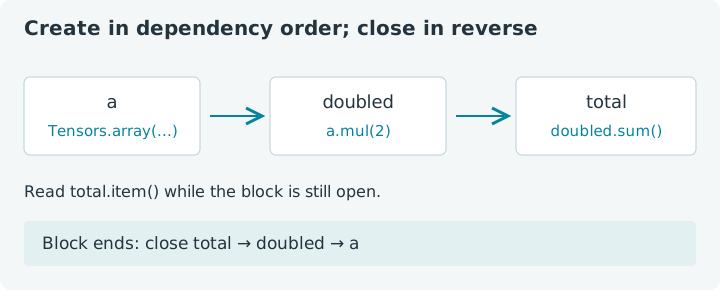
The resource declarations below close in reverse order: first total, then
doubled, then a. Nothing needed by a later operation is closed early.
6. Own each intermediate
With the original six values, expect 42.0. Add a temporary tensor that shifts
doubled by one before summing. Include it in the resource list, and predict
the new total: six extra ones make 48.0. This is a small exercise in tracing
both the numerical dependencies and the objects you own.
On this CPU backend, release is currently a no-op and arrays are reclaimed by
Java's garbage collector. Consequently, using a CPU tensor after close() is
not a reliable way to demonstrate an error. Do not build portable code around
that behavior: a GPU backend releases real device buffers. The closing pattern
expresses your ownership regardless of where the calculation runs.
Long fluent chains create temporary tensors too. The browser's
GPU Monte Carlo example
uses the notebook-specific BrowserWebGpuBackend.scope() to reclaim anonymous
intermediates. That helper belongs to the browser adapter, not to the general
jax4j core API. Here, short named resources keep the same issue visible without
requiring GPU support.
Put the three questions together
Before running a new tensor calculation, ask: how are the values arranged, how are they represented, and who owns each result? Shape errors, rounding surprises and forgotten buffers become much easier to reason about when those questions have separate answers.
For a final experiment, return to the six original values, reshape them to
[3, 2], sum along axis zero, and divide by three. The two column means should
be [3, 4]. Use short resource declarations for the reshaped tensor, sum and
mean. Then change the input and predict the answer again. You now have enough
pieces to turn these little matrices into experiments of your own.
Continue with elementwise operations and broadcasting for more experiments, or revisit your first tensor and give its calibration example a two-dimensional shape.