Looking for NumPy in Java? Meet jax4j.
 Petr Pravda· 9 min read
Arrays, broadcasting and GPU computing in an editable Java notebook.
Run cells from top to bottom. Typed declarations and imports carry into later cells. Shift + Enter runs a cell. Reloading or leaving this page discards edits and Java state.
Four sensor readings, three features, and one constant column. Standardize them, then calculate two scores per reading. What does it look like in Java?
jax4j offers a NumPy-style tensor workflow for Java: shaped numerical arrays, elementwise arithmetic, broadcasting, reductions and matrix multiplication. It is our open-source project, licensed under Apache 2.0. It aims to align its tensor operations and function transformations with Google’s JAX Python library. The library is available on Maven Central, published through Sonatype’s Central Portal.
Try the array model here without installing a JDK. It is not a drop-in NumPy implementation.
Run cells from the top. Run all also attempts the GPU cell; without WebGPU, run cells 1–6 individually for the complete CPU example. First use starts a browser JVM. Reloading or leaving discards edits and results.
Give the axes names before giving them numbers
These are constructed observations. Axis zero means observations; axis one means features. A tensor is a numerical array with a shape and dtype (element type).
1. Define the observation matrix
The shape is [4,3]; flat output follows row order. These tensors calculate
in F32 (single precision), even when a scalar method accepts Java double.
The dependency fetches jax4j 0.2.1 from Google's Maven Central mirror. Use the
same com.nablatensor:jax4j-core:0.2.1 coordinate in local Java 25 applications.
This notebook automatically loads its browser GPU adapter. The browser uses
custom OpenJDK 27; its emulated CPU timings are not native Java benchmarks.
Standardize columns, including the awkward one
Standardization subtracts each column's mean and divides by its standard
deviation. We use the population convention: the squared deviations are summed
and divided by the number of rows, matching NumPy's default ddof=0.
For these columns, the means are [13,100,7] and the variances [5,200,0].
The last column would give 0/0. We explicitly floor the standard deviation
at 0.000001, so this constant feature becomes zero. The floor also changes nearly constant
features; it is a chosen preprocessing policy.
The corresponding Python expressions, for orientation, are:
x = np.array([[10, 100, 7], [12, 120, 7],
              [14, 80, 7], [16, 100, 7]], dtype=np.float32)
z = (x - x.mean(axis=0)) / np.maximum(x.std(axis=0), 1e-6)
Only Java executes here. In this release we build the axis mean from sum(0)
and division, and the variance from squared centered values.
2. Center and scale each feature
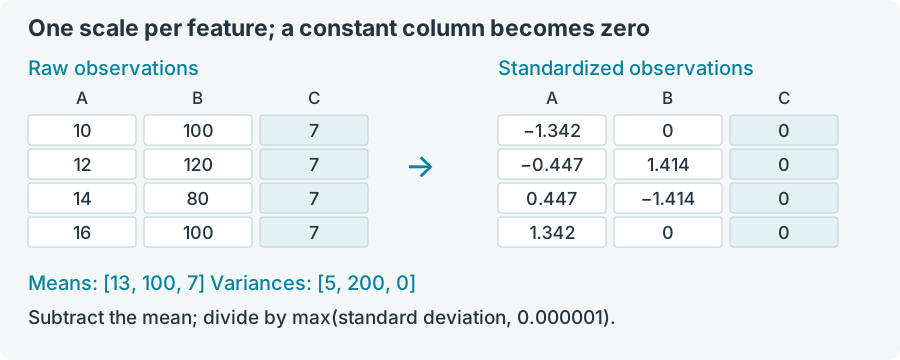
The first standardized value is (10−13)/√5 ≈ −1.341641. Varying columns
have mean zero and variance one, within F32 rounding; the constant column
retains variance zero.
Try it: multiply column two by ten; standardization should be unchanged.
For a learning application, fit means and scales on training data and reuse them for future observations. This demonstration fits and transforms one batch.
Broadcasting says which values are shared
Subtracting means with shape [3] from x with shape [4,3] applies one
mean to each feature, across all four observations. NumPy's broadcasting
rule compares shapes
from the right: aligned dimensions must match or one must be one; missing
leading dimensions act like ones. jax4j uses that shape rule here.
There is no Java operator overloading: x.sub(means) expresses the subtraction.
Nor does compatible broadcasting guarantee identical storage behavior to NumPy;
jax4j 0.2.1 can materialize expanded operands. You own the returned tensors.
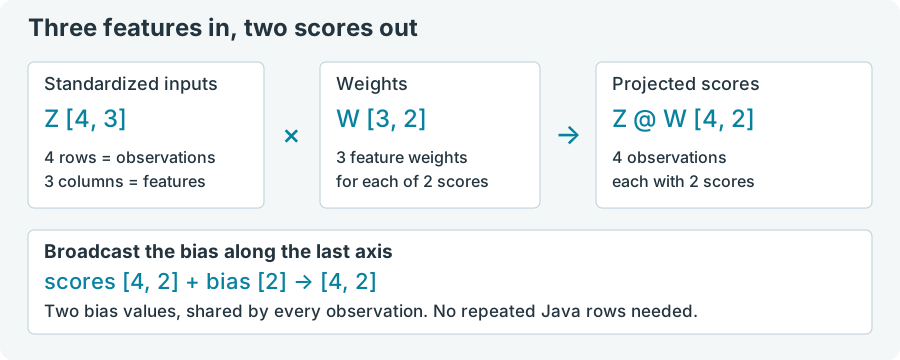
Next, map three features into two scores. These fixed weights illustrate a
linear map; they have not been trained. matmul contracts the shared feature
axis: [4,3] @ [3,2] gives [4,2]. A bias [0.5,−0.25] then aligns with
the two output columns. In Python that step is scores = z @ weights + bias.
3. Multiply matrices and broadcast a bias
Original score rows are approximately
[−0.841641,−0.25], [0.052786,1.164214], [0.947214,−1.664214] and
[1.841641,−0.25].
Change bias to [1,0] and rerun cell three. Every first score rises by 0.5;
every second score rises by 0.25. mul(w) would request elementwise
multiplication, not this matrix product.
A whole pipeline in one expression
Average each score column’s positive part: project, add bias, clamp negatives
with relu(), sum observations, and divide by all rows. This CPU example
uses the same data and weights as the preceding cell.
4. Chain the whole calculation
Expect approximately [0.7104102, 0.2910534]. Jit.apply runs this CPU
function and manages intermediates; try closes inputs and output. Print
outside the lambda. See your first JIT compile.
Reduce the result, then check an invariant
A reduction combines positions. scores.sum(0) totals each column over
observations; dividing by the row count gives column averages.
Centered columns have mean zero, so their weighted sums do too. Average
scores should therefore equal the bias [0.5,−0.25], even after changing inputs.
5. Check the average score
Expect overall average 0.125. The tolerance suits this fixture, not arbitrary
inputs. Next, cross-check the matrix product with ordinary Java loops.
6. Cross-check with plain Java arithmetic
Change the shape: add a fifth three-feature observation, rerun from cell
one, and watch the score shape become [5,2]. The weights and bias remain
compatible. Adding a fourth feature instead requires a fourth weight row
(two more entries in weights).
Running Java outside the browser
The browser settings below are only for this web Java notebook. A native Java 25 application needs no Chrome flags, WebGPU browser support or emulated JVM. Its GPU engines call native libraries through Java's Foreign Function and Memory (FFM) API, without a separate JNI wrapper.
Install compatible GPU drivers, add the matching jax4j backend JAR, and
make its native libraries available. Drivers alone are not sufficient for every
backend: jax4j-engine-wgpu, for example, needs wgpu-native, which this release
does not bundle. Launch with --enable-native-access=ALL-UNNAMED. See the
native installation guide.
Prefer native execution for regular workloads: it avoids browser adapter restrictions and emulation/bridge overhead, with fewer browser failure points. Expect better performance, especially for Java-heavy work, but workload and hardware determine the gain; this notebook is not a comparative benchmark.
try closes results in reverse order. Java arrays carry state between cells;
recreating tensors avoids retaining old handles. Large GPU pipelines should
keep tensors resident and retrieve only needed outputs.
Send the same score calculation to WebGPU
This cell uploads the standardized observations, weights and bias to the browser GPU, multiplies and adds there, then reads back the scores. Run after cells 1–6.
Browser setup
Use HTTPS or localhost and compatible hardware, drivers and browser. Save edits before relaunching, then reopen this page and rerun the CPU cells.
| Desktop browser | What to enable or check |
|---|---|
| Chrome | Try defaults and graphics acceleration; inspect chrome://gpu. On Chrome 155 / Linux / AMD RDNA 3, defaults gave no adapter; enabling only chrome://flags/#force-enable-webgpu-interop (Force enable WebGPU interop) and relaunching restored matching results. See Chrome troubleshooting for other configurations, including enable-unsafe-webgpu and Linux Vulkan experiments. Change one setting at a time. |
| Edge | Enable graphics acceleration in Settings → System and performance; inspect edge://gpu. If needed and available, enable edge://flags/#enable-unsafe-webgpu or Linux edge://flags/#enable-vulkan, then relaunch. See Microsoft’s support notes. |
| Firefox | In about:config, set dom.webgpu.enabled to true, then restart. Windows and Apple Silicon macOS enable it by default; Linux and Intel Mac remain experimental. See Mozilla’s platform notes. |
| Safari | Use Safari 26+ on a supported Apple platform; WebGPU ships enabled. No experimental flags are needed. |
A flag at Default may already allow WebGPU.
7. Browser GPU score calculation
Expect adapter information, wgpu:0, and the same eight scores as cell three,
within F32 rounding. This tiny fixture demonstrates placement, not a speedup.
The bridge supports selected F32 operations, not every native-engine feature
or generated JIT kernel.
If WebGPU is unavailable
A GPU cell shows “WebGPU is unavailable in this browser. CPU cells are still available.” when the API is absent. If the API exists but provides no adapter, expect “The browser did not provide a WebGPU adapter.” An explicitly reported software adapter is rejected too. Disabled browser support can cause either of the first two outcomes; a flag's value alone does not diagnose it.
Earlier CPU outputs remain usable. Run all stops at the failing cell; there is no silent CPU fallback. After changing browser settings, reopen the page and run from the top. A secure-context or notebook-isolation startup error is separate from GPU availability and can prevent CPU execution too.
To explore the shape rules further, open elementwise operations and broadcasting, then matrix multiplication and linear algebra. For device installation and placement, continue with start on CPU, select a GPU engine. The jax4j source and README document the library beyond this notebook.