Your first tensor on Java 25
Turn four readings into calibrated values, reduce them to a mean, and change the experiment yourself.
Run cells from top to bottom. Typed declarations and imports carry into later cells. Shift + Enter runs a cell. Reloading or leaving this page discards edits and Java state.
Four readings, one useful calculation
A sensor reports [1, 2, 3, 4]. Its calibration says “multiply by 1.5, then
add 0.5.” You want the corrected readings and their average. Small enough to
check in your head; useful enough to introduce the tensor operations you will
reuse in much larger computations.
A tensor holds numerical values together with their shape, element type and device. Our four readings form a vector: a tensor with one axis. An operation such as multiplication applies to its elements without a Java loop in your application code. The backend carries out that work.
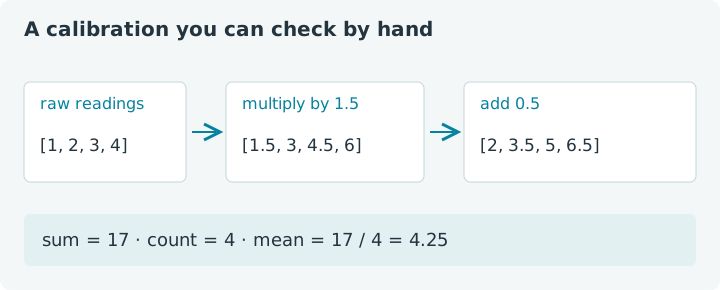
The diagram is also our numerical reference. Keep it in view when changing the code: a tensor API is much easier to learn when the answer is inspectable. There is no market data or measurement behind these values; this is a constructed calibration example.
This lesson is a notebook. Choose Run all for a complete first pass, then edit individual cells and run them again. The Java kernel starts on your first execution. Compilation and execution happen in this browser; downloading the runtime can take a little while. No local Java installation is needed for these cells. Reloading discards your edits, so copy experiments you want to keep.
1. Meet the library
Run this setup cell first. It loads the bundled jax4j 0.2.1 core library, imports the small API surface we need, and selects CPU execution. The following cells reuse those imports. Restart creates a fresh session: run setup again afterward.
1. Load jax4j
The browser guest reports Java 27. The lesson title refers to jax4j's Java 25 requirement; a newer Java runtime can execute this library too. The guest uses an emulated interpreter, so its timings are useful for understanding notebook behavior, not for judging native Java performance.
In your own project, use Java 25 or newer and the
com.nablatensor:jax4j-core:0.2.1 dependency. The
jax4j repository contains the project
setup and optional engines. Here, the dependency comment supplies the library
without a Maven project. It is notebook syntax, not a Java language feature.
2. Give the readings a home
Tensors.array creates a tensor from a Java array. We keep the readings as a
named Java variable so later cells can reuse the same experiment. The tensor
itself lives inside a try block, which closes it when the block finishes.
2. Create a vector
You should see [1.0, 2.0, 3.0, 4.0], shape [4] and dtype F32. The shape
says “one axis, four elements.” F32 means each element is a 32-bit floating-point
number. Those facts describe different aspects of the tensor: the shape gives
its arrangement, while the dtype gives its numerical representation.
Try this: append a fifth reading, 5, and rerun this cell. Predict the new
shape before looking at the output. Then restore the original four values to
follow the printed reference answers. Changing the array length changes the
shape inferred by this factory; there is no separate dimension to update here.
toFloatArray() obtains a Java copy of the values. It is convenient for four
numbers. For a huge GPU tensor, downloading every value is a substantial part
of the work; later examples will reduce on the device and read one answer.
3. Calibrate every element
Set the two calibration parameters and run the next cell. Each operation returns a new tensor. Naming the intermediate makes both the arithmetic and its lifetime visible, while keeping the snippet short.
3. Scale, then shift
The result is [2.0, 3.5, 5.0, 6.5]. The original tensor still contains the raw
readings: mul and add create results rather than changing x in place.
Scalar arithmetic applies the same gain or offset to every element. A separate
Java loop would express the same calculation; the tensor form lets the backend
execute it as an array operation.
Now set gain to 2 and offset to -1. Before running, work out the first
and last outputs. You should get [1, 3, 5, 7]. That quick check catches two
common mistakes: adding the offset before scaling, or assuming an operation
has modified the input. The order matters: (x × gain) + offset generally
differs from (x + offset) × gain.
The notebook preserves successful, explicitly typed declarations such as
float gain. Editing one cell does not automatically rerun later cells. Run
the cells you want to update; use Run all when you want the complete
calculation rebuilt in order.
4. Ask for one answer
A reduction combines elements into fewer values. sum() collapses this
vector to one value. Dividing that sum by the reading count gives the mean.
We recreate the short-lived tensors here from the saved Java readings and
calibration parameters, rather than carrying open tensor handles between cells.
4. Reduce to the calibrated mean
With the original inputs and parameters, the sum is 17.0 and the mean is
4.25. If you kept the previous experiment's gain of two and offset of minus
one, expect 16.0 and 4.0 instead. Your result follows the current notebook
state, not the original diagram.
item() reads a tensor containing exactly one element. It is a useful boundary:
perform the array work first, then bring the one answer into ordinary Java.
Calling it on the four-element vector would be an error. toFloatArray() reads
all elements; choose the method that matches the result you actually need.
Make a prediction: replace the readings with [2, 4, 6, 8], set the gain to
0.5 and offset to -1, and rerun cells two through four. The corrected values
should be [0, 1, 2, 3], so the mean is 1.5. Can you get a mean of zero by
changing only the offset? Work it out before reaching for Run.
5. Change a copy
Tensor arithmetic did not overwrite the input. What about changing an array
returned by toFloatArray()? This small experiment makes the ownership boundary
concrete. It uses its own input, so it will not change your saved readings.
5. A downloaded array is a copy
The Java copy becomes [999.0, 20.0]; the tensor remains [10.0, 20.0]. For
this CPU implementation, both uploading and downloading copy the array. A
Java array is not a live, writable window into tensor storage. This is a useful
habit to establish now, before the storage might belong to another device.
Try changing copy[1] too. Then add a fresh tensor made from copy inside the
block and print it. You have now explicitly chosen when to move edited Java
values back into tensor computation. Remember to close that extra tensor with
its own try block or a resource declaration.
Your next experiment
Keep the input small and invent a calibration you can check yourself. Change one parameter at a time, predict the mean, and compare it with the reduction. Then add a second transformation, such as squaring the corrected values before summing. Give its result a name and include it in the resource declarations. There is plenty to explore with four numbers!
Your first tensor calculation now has a clear path: Java values become a
tensor, operations produce new tensors, a reduction produces one value, and
item() returns that value to Java. The try blocks make ownership explicit.
CPU tensor storage uses managed heap arrays; the same closing pattern becomes
essential when a backend owns GPU buffers.
Continue with shapes, dtypes and tensor lifetimes to arrange six values into rows and columns, explore axis reductions, and see why a floating-point dtype cannot represent every integer. For a GPU chain, return to the interactive project introduction and its Monte Carlo π cell.